
Building software is like constructing a building. You need different materials, each serving a specific purpose. Similarly, software applications consist of various components that work together to create a functional system. Knowing how to classify software applications components helps organize these building blocks effectively.
Understanding how to classify software applications components is crucial for developers, architects, and anyone involved in software development. Proper classification makes your code organized, easier to maintain, and scalable for future growth.
What Are Software Components?
Software components are individual pieces of code that perform specific tasks within an application. Think of them as building blocks. Each component has a clear purpose and can communicate with other components to make the entire application work smoothly.
These components can be small functions or large modules. The key is that they are reusable, replaceable, and independent enough to be modified without breaking the entire system.
Why Classification Matters
Before we explore how to classify software applications components, let’s understand why it’s important.
Proper classification helps teams locate code quickly, understand how different parts connect, and avoid duplicating work. It also makes onboarding new developers easier because the codebase follows a logical structure.
When components are well organized, fixing bugs becomes faster, and adding new features doesn’t require rewriting existing code. This saves time and money while improving overall software quality.
Classification by Architectural Layers
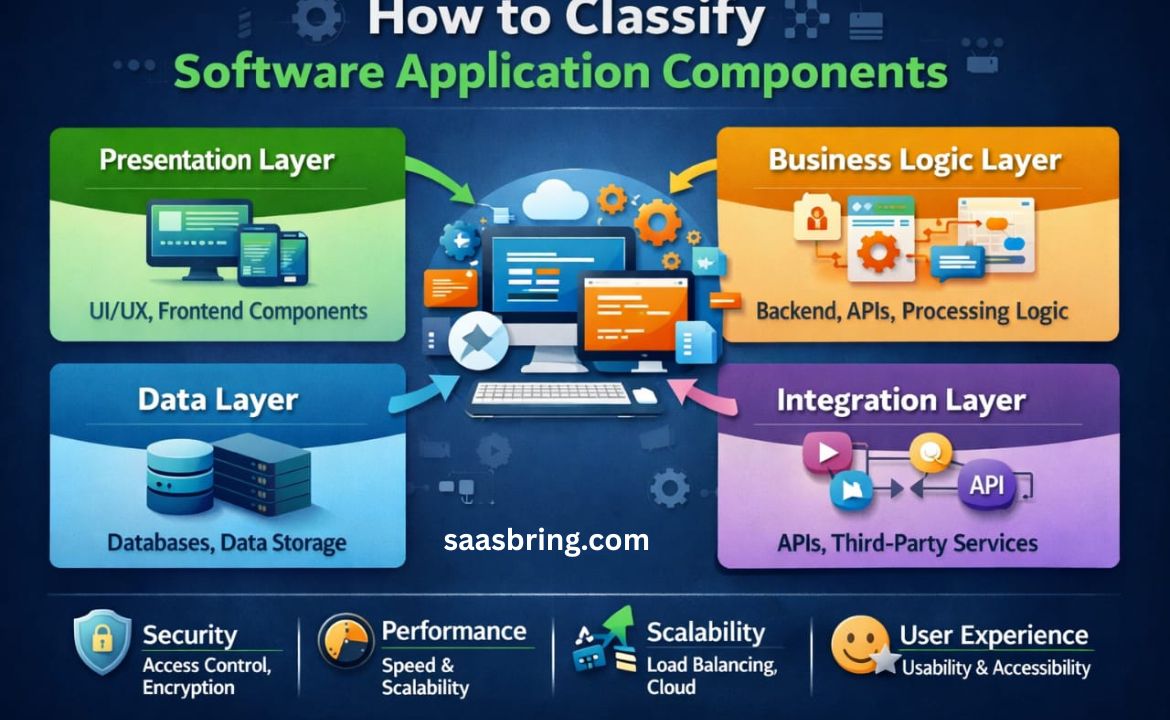
The most widely used approach to classify software components is by architectural layers. This method organizes components based on where they sit in the application’s structure.
Presentation Layer
These components handle everything users see and interact with. They include buttons, forms, navigation menus, and visual elements. The presentation layer takes user input and displays information in an understandable format.
Modern applications use frameworks like React, Vue, or Angular for presentation components. These make interfaces responsive and engaging.
Business Logic Layer
This is where the application’s brain lives. Business logic components process data, make decisions, and enforce rules that define how your application behaves.
For example, in an e commerce application, business logic determines how discounts are calculated, whether a product is in stock, and what happens when a user places an order.
Data Layer
Data layer components manage how information is stored and retrieved. They communicate with databases, handle queries, and ensure data integrity.
These components abstract the complexity of data management, so other parts of the application don’t need to know whether you’re using MySQL, PostgreSQL, or any other database system.
Integration Layer
Modern applications rarely work in isolation. Integration components connect your application with external services, APIs, payment gateways, and third-party tools.
These components handle communication protocols, data formatting, and error handling when interacting with outside systems.
Classification by Functionality
Another effective way for how to classify software applications components is by their functional role in the system.
Core Components
These are the foundation of your application. Core components provide essential services like user authentication, security, logging, and configuration management.
Without core components, your application cannot function. They are loaded first and remain active throughout the application’s lifecycle.
Feature Components
Feature components deliver specific capabilities that users directly interact with. Each feature is self-contained and provides value on its own.
In a social media application, features might include posting updates, messaging, photo sharing, and friend connections. Each feature component encapsulates everything needed for that functionality.
Utility Components
Utility components are helpers that provide common functions used across the application. They include date formatting, text validation, currency conversion, and other general-purpose tools.
These components don’t provide business features directly but support other components in performing their tasks efficiently.
Infrastructure Components
Infrastructure components provide technical support for the application. They handle caching, monitoring, performance optimization, and deployment processes.
While users never see infrastructure components directly, they ensure the application runs smoothly and efficiently.
Domain Driven Classification
For complex business applications, domain-driven design offers a powerful classification method. This approach organizes components around business concepts rather than technical layers.
Domain Entities
Entities represent real-world business objects that have unique identities. In a banking application, entities might include Customer, Account, and Transaction. Each entity has attributes and behaviors relevant to the business.
Value Objects
Value objects describe characteristics without unique identities. Examples include Address, Money, or DateRange. Two addresses with the same street, city, and postal code are considered identical.
Services
Domain services implement business operations that don’t naturally belong to a single entity. For instance, a TransferService might handle moving money between accounts, involving multiple entities and business rules.
Repositories
Repositories provide an interface for accessing and storing domain entities. They hide the technical details of data persistence, allowing business logic to focus on domain concepts rather than database operations.
Classification by Reusability
Understanding component reusability helps organizations build libraries and reduce code duplication. Learning how to classify software applications components by reusability creates efficiency across projects.
Single-Use Components
These components are designed for one specific application and context. They’re tightly coupled to particular business requirements and aren’t intended for reuse elsewhere.
Domain-Reusable Components
These components can be used across multiple applications within the same industry or business domain. A payment processing component built for one retail application might work in another retail system.
Universal Components
Universal components provide broadly applicable functionality that works across any domain or application. String manipulation libraries, date utilities, and HTTP clients fall into this category.
These components are excellent candidates for open-source projects or internal component libraries shared across an organization.
Classification by State Management
How components handle data and state is another important classification dimension.
Stateless Components
Stateless components don’t remember anything between uses. They receive input, process it, and return output without storing information. This makes them predictable, easy to test, and simple to scale.
Stateful Components
Stateful components maintain information over time. They remember user preferences, track shopping cart contents, or keep session data. While more complex, they’re essential for interactive applications.
State Management Systems
These specialized components handle application-wide state. They ensure data consistency, manage updates, and provide a single source of truth for application state.
Practical Implementation Tips
When implementing component classification in your projects, start with clear documentation. Create a component catalog that describes each component’s purpose, classification, and relationships with other components.
Use consistent naming conventions that reflect classification. Prefixes like “ui-“, “service-“, or “util-” immediately communicate a component’s type and purpose.
Organize your project directory structure to mirror your classification system. Group related components together in folders that match their categories.
Regularly review and refine your classification as the application evolves. What works for a small application might need adjustment as the system grows.
Train team members on your classification system. Everyone should understand the categories and follow consistent patterns when creating new components.
Common Classification Mistakes to Avoid
Don’t create too many categories. Overly complex classification systems become burdensome and defeat the purpose of organization. Start simple and add categories only when necessary.
Avoid mixing classification approaches inconsistently. Choose your primary classification method and apply it systematically across the entire codebase.
Don’t classify components in isolation. Consider dependencies and relationships between components to ensure your classification reflects how they actually work together.
Remember that classification serves developers, not the other way around. If your classification system makes development harder rather than easier, it needs adjustment.
Conclusion
Learning how to classify software applications components is an essential skill that transforms chaotic codebases into organized, maintainable systems. Whether you organize by architectural layers, functional purpose, business domain, or reusability, a thoughtful classification system brings clarity and efficiency to software development.
The right classification approach depends on your project’s size, complexity, and team structure. Start with basic layer-based classification for simpler applications, then adopt more sophisticated approaches as complexity grows.
Remember that classification isn’t a one-time task but an ongoing process. As your application evolves, regularly review and adjust your component organization to ensure it continues serving your team’s needs effectively.